
View or Download Stream Stats
How to access Stream Stats
The Stream Stats feature in the HDOnTap Portal provides monthly analytics reports for your live streams. You can review combined performance across all streams or open detailed reports for individual streams.
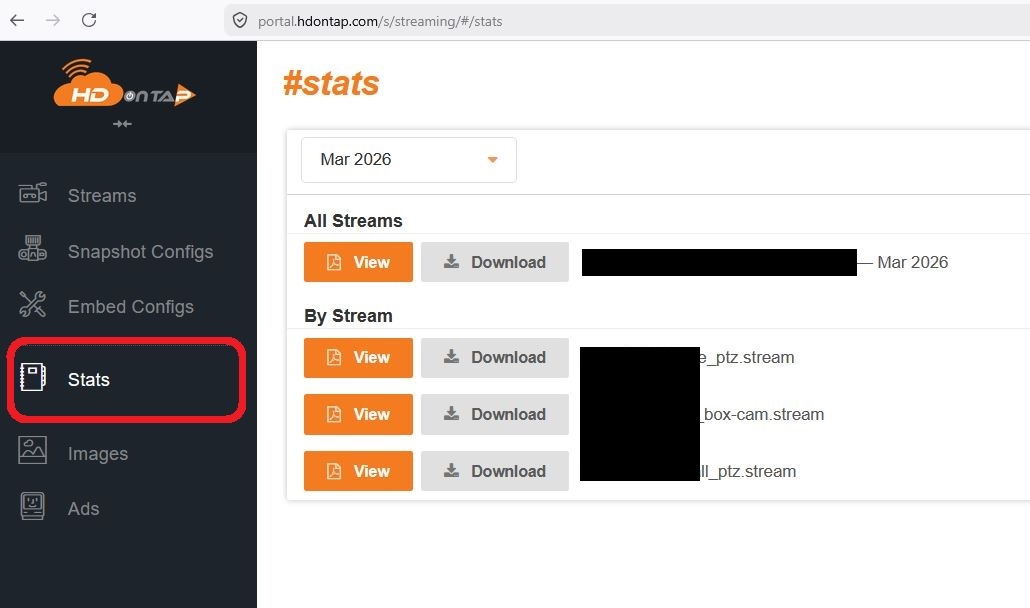
To access Stream Stats, click Stats in the left-hand menu of the Streaming section of the portal. Select a month, then choose View to open a report or Download to save a PDF copy.
Reports include key performance metrics such as:
- Peak viewers
- Average viewers
- Unique viewers
- Watch hours
- Average watch time
- Data transferred
Depending on the report, you may also see:
- Combined viewer timeline
- Stream summary tables
- Traffic source and referrer charts
- Device usage charts
- Viewer retention curves
- Viewer count trends
- Average viewers by day and hour
- Daily watch hours
- Viewer distribution by state and country
How to Use Stream Stats
Stream Stats can help you:
- Measure audience growth over time
- See which streams attract the most engagement
- Understand how long viewers are watching
- Identify where traffic is coming from
- Learn which devices viewers use most
- Spot the best times and days for viewer activity
- Understand where your audience is located
Viewing vs. Downloading Reports
Use View to open the selected report in your browser.
Use Download to save a PDF copy of the report for your records or to share with others.